Origami
0.29.1See what's new

You, on your terms.

A terminal manager that keeps terminals, agents, and commands together as saved project workspaces.

Origami
Loops
Agents
Terminals
Commands
Agents
Terminals
Commands
Tabs⌘P Actions⇧⌘P
Origami
What's next for Origami?
Ask anything, @ to bring something in, / for a command, ! for the shell
Opus 5.5High NormalEdit freely
main
Start from this workspace
Review the changes on main 2 files
Take ORI-45 from the board Snap the sidetrack's width to the terminal grid
Explain how this code is laid out origami
Plan a feature Before any code
Terminal 1 Terminal 2
➜ origami pnpm vitest run terminalGrid
✓ src/lib/terminalGrid.test.ts (6 tests) 4ms
 
Test Files 1 passed (1)
Tests 6 passed (6)
➜ origami
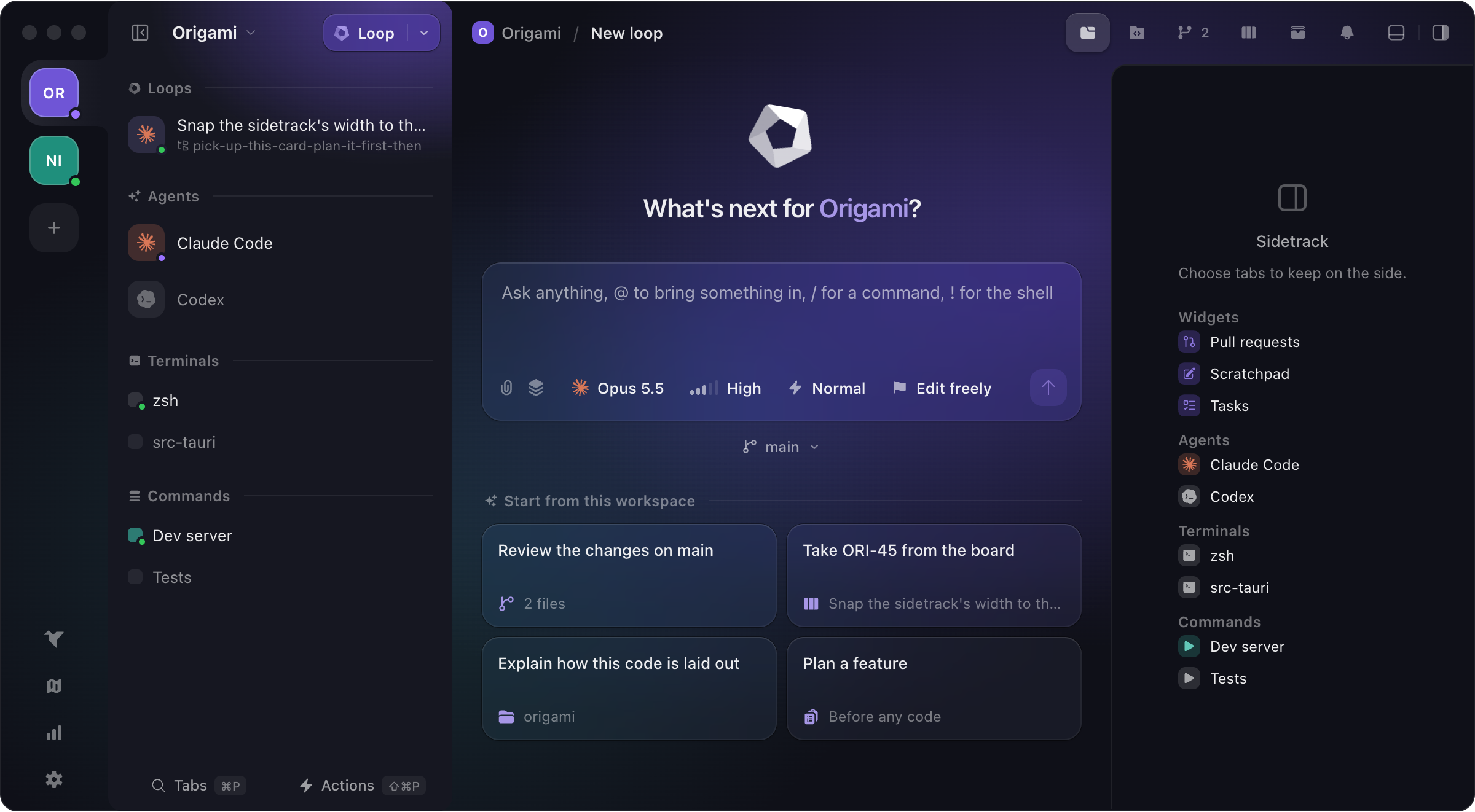
Origami: two workspaces on the rail, a workspace's loops, agents, terminals and commands in the sidebar, a new loop, and the sidetrack.

Origami adapts to you and your tools.

Group all your agents, terminals and commands in a workspace. Then, have all your workspaces in Origami. Switching projects becomes a no-brainer.

Should you subscribe?

Origami offers a very generous free tier without gating features behind subscriptions. For most users, free tier is more than enough. For power users or Origami supporters we offer a single subscription that removes the workspaces and workspace items limits.

Free

For developers getting organized.

€0For good
Download free
  • Workspaces
  • Terminals, agents, and commands
  • Built-in git panel
  • Kanban board
  • Artifacts
  • Built-in MCP tooling
  • Full keyboard navigation
  • Idle notifications
  • Up to 5 workspaces
  • Up to 10 items per workspace

Origami+

For power users with lots of projects.

Subscribe
  • Everything in the Free plan
  • Unlimited workspaces
  • Unlimited items per workspace
  • Up to 5 devices
  • Early-access to new features
  • Priority support

Enterprise

For teams buying seats together.

€15Per month
Subscribe
  • Everything in Origami+
  • From 5 seats up
  • 2 devices per seat
  • One invoice, one renewal
  • Invite and revoke anytime
  • Admin roster with device control

Payments are handled by Stripe.

More than a place to talk to agents.

Orca and T3 Code are good tools, and like Origami, they're free. Each one does something the others don't, so here are the three side by side. Pick the one that fits how you work.

Origami Terminal manager Orca Agent IDE T3 Code GUI for coding agents
Where Origami stands out
What a workspace holds Has it: Terminals, commands, agents and browsers, from any folders In part: One worktree or folder, with its terminals and browsers In part: One project's chat threads
Task board Has it: Yes, agents can update it In part: Agents and worktrees sorted by status Doesn't have it: No
Documents from agents Has it: Plans and reports, kept as versions you can annotate In part: Files they write, shared as a public link In part: HTML replies in the chat
Agents answer your review comments Has it: Yes, they reply in the thread and resolve it In part: Your comments go to the agent as one prompt In part: Your comments go with your next message
Agents control the app Has it: Tabs, board, documents, reviews and browsers Has it: Worktrees, terminals and browsers Has it: Threads, projects and scheduled tasks
A record of what agents did Has it: Every call they make to Origami, with its input and output Doesn't have it: No Doesn't have it: No
No usage tracking Has it: None at allNo analytics or crash reports Doesn't have it: AnonymousOn until you turn it off in Settings Doesn't have it: Tied to hashed IDs of your accounts, Claude and OpenAI includedOn until you set an environment variable
Built on TauriMemory-safe Rust, and a web view that only reaches what it's allowed to ElectronNode.js and a bundled Chromium ElectronNode.js and a bundled Chromium
Download size 21 MB 282 MB 195 MB
Agents and code
How you work with agents Chat with them in loops, or run their own CLI in a terminal Chat with them, or run their own CLI in a terminal Chat with them
A worktree per task Has it: Yes Has it: Yes Has it: Yes
Editing code Has it: An editor Has it: An editor In part: A simple editor
Reviewing changes Has it: Yes, comment on any line Has it: Yes, comment on any line Has it: Yes, comment on any line
Pull requests and issues In part: GitHub and GitLabPull requests only Has it: GitHub, GitLab, Bitbucket and moreIssues too, Linear and Jira included In part: GitHub, GitLab, Bitbucket and morePull requests only
Built-in browser Has it: Yes, agents can use it Has it: Yes, agents can use it Has it: Yes, agents can use it
From your phone or a server Doesn't have it: No Has it: iOS, Android and SSH Has it: iOS, Android, the web and SSH

General questions

What exactly is Origami?
A terminal manager that organises your work by project. A workspace keeps a project's terminals, agents, commands and browser tabs together.
Does it replace my terminal?
It can. Every tab is a real terminal running your own shell and dotfiles, so there is nothing to set up again.
Which agents does it support?
Any agent that runs in a terminal. Claude Code, Codex, Copilot, Antigravity, OpenCode and Pi have ready-made entries; you install and sign in to them yourself.
Is it really free?
Yes. Origami Free has every feature and needs no account, with up to 5 workspaces and 10 items in each. Origami+ removes those limits for €5 a month.
Does my work leave my machine?
No. Your terminals, commands, files and agent conversations are never sent to us. Only subscribers give us anything: an email address and the devices their licence is used on.